Exark Crew Guide - Assignments, Tags and Expend Decisions
Learn how to hire and assign Exark crew, compare repeated bonuses with expend effects, and use crew tags to improve Food, Guild and combat builds.

What Are Crew Members in Exark?
Crew members are specialists that can be hired, assigned to a building, used as a tag in a synergy, or expended for a one-time effect. They are not a separate decoration layer: crew changes the value of the building slot, the resource cycle and the route you can safely take.
The best crew member is therefore contextual. A Food specialist is usually more important when the ark is barely cycling; a damage or trigger specialist is more valuable after the weapon and its supporting layout are already active.
How to Hire Crew
Inspiration is the main resource for hiring or unlocking crew during a voyage. Build enough Inspiration to improve the next decision, but do not add Inspiration buildings so quickly that Food turns negative.
When a draft offers a new crew member, check these fields before spending:
| Field | Why it matters |
|---|---|
| Tag | It may complete a Guild, creature, Artisan, military or other chain |
| Assignment effect | The bonus may apply only to a building or cycle type |
| Trigger | It may activate on assignment, acquisition, flight, settlement or combat |
| Slot cost | The building may not have room for the crew member |
| House glyph | Patch 1.03 makes House-specific content easier to identify |
| Expend effect | The immediate benefit may compete with repeated assignment value |
The tooltip is the source of truth for the current version. The public game description and patch notes establish the system, but not a complete live roster or every numeric skill value.
Where Should I Assign Crew First?
Use this default priority, then adjust for the current bottleneck:
| Priority | Building role | Why |
|---|---|---|
| 1 | Food or cycle engine | Keeps every later building active |
| 2 | Main Production or Inspiration source | Improves the quality of future drafts |
| 3 | Primary weapon or Armor source | Helps the route survive when combat is the limiting factor |
| 4 | Gold or market engine | Buys flexibility when the route needs it |
| 5 | Trigger or multiplier building | Scales after the base cycle is already reliable |
A mismatched crew member is not always better than an empty slot. If the assignment consumes a slot needed by a trigger or removes a tag interaction, wait for a better match.
Assignment vs Expend: The Key Crew Decision
Assign for Repeated Value
Assign a crew member when the building will cycle often enough for the bonus to pay back. This is especially strong on Food producers, fast production buildings and the main weapon once the route is stable.
Ask:
- How many cycles will happen before the next settlement?
- Does the building already have the range, Food and trigger conditions it needs?
- Does the crew member add a tag that improves another object?
Expend for Immediate Value
Expend a crew member when the one-time effect solves an immediate timing problem: a stalled Food engine, a needed upgrade, a required building or a dangerous combat window.
Do not expend automatically because a crew member has no obvious assignment. Keep the member if the next route or building can activate a better repeated bonus. Conversely, do not keep a crew member forever if its assignment cannot cycle before Morale reaches zero.
Crew Tags and Building Synergy
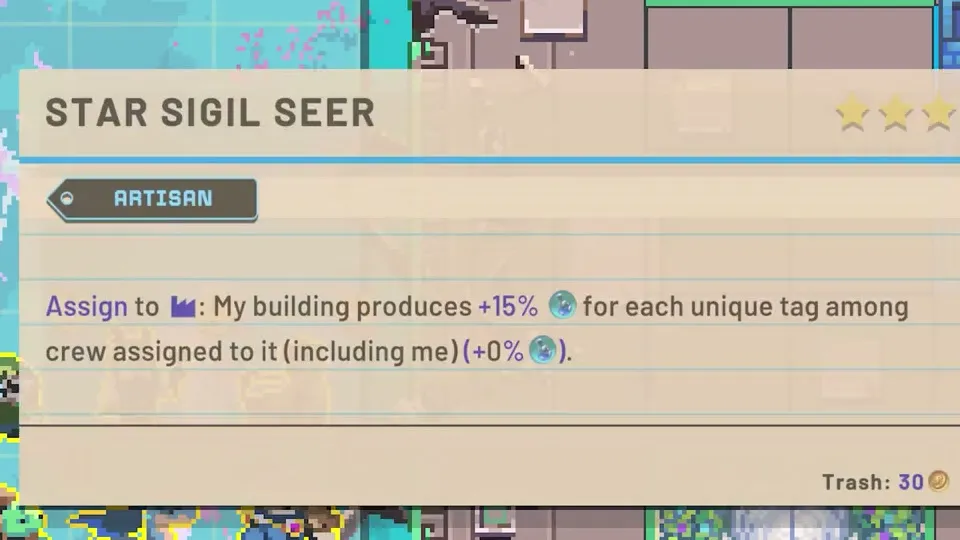
Tags can make a crew member worth more than its printed assignment effect. A Guild-focused board may want multiple Guild identities; an Artisan or academic board may value a different set; a military engine may need crew that amplifies weapons, control or Armor.
Wanderbots’ run shows how reading tags can change which crew member is chosen, while Sifd’s Guild-focused run demonstrates how crew can make a wider tag chain work. The general sequence is:
- decide the current engine;
- count the matching tags already on the ark;
- check whether the new crew member adds a repeated benefit or only a label;
- assign it where the building will cycle;
- keep enough open slots for a route-specific answer.
Crew in Food and Production Builds
Food and Production crew often have the highest early value because they compound across later cycles. A small bonus on a fast producer can supply the Food, Production and Inspiration needed to obtain stronger crew later.
Ultra C’s run is a useful illustration of the order: solve the Food shortage, then use better production and crew interactions to expand. Adding a late-game multiplier before the foundation works usually produces a board that looks sophisticated but cannot cycle.
Crew in Military Builds
Military crew should be assigned only when the weapon has the space, range and Food support to fire consistently. Compare the crew bonus with the weapon’s cycle time and the Morale gained from attacks.
Patch 1.03 adds floating text for Morale gained from attacking military buildings. Use the feedback after assigning a crew member: if the attack is still not paying back incoming damage, the next crew slot may belong on Food, Armor, control or cycle speed instead.
Crew, Space and Immovable Buildings
Crew occupies the same strategic space as buildings and relic effects. An Immovable building with no crew slot or no valid neighbor can permanently reduce the value of the board. Patch 1.03 makes the Immovable tag visible on Rite buildings, so check it before assigning the first specialist around that area.
When space becomes tight, prefer crew that:
- improves an already fast cycle;
- completes a tag chain already present;
- replaces the need for a separate building;
- supports both economy and combat through a global effect.
What Recent Gameplay Videos Teach
The linked runs are useful because they show crew decisions over time rather than as isolated tooltips:
- Ultra C: crew assignment is strongest after the Food bottleneck is understood; trigger and crit engines need a stable base.
- Wanderbots: tags and repeated crew acquisition can reshape the whole ark, but the board still needs space and an exit plan.
- Sifd: Guild and crew stacking can create very high output, yet late enemies and limited space can expose a missing defense or damage type.
These are observations from public gameplay videos, not universal tier rankings. The draft, House, route and version can change a crew member’s value.
A Practical Crew Workflow
- Read the tooltip and identify the tag, trigger and House glyph.
- Name the current bottleneck: Food, Production, Inspiration, Gold, Morale or space.
- Assign the crew member to the most frequent relevant cycle.
- If no assignment pays back, compare the Expend effect with the risk of keeping the member.
- Recheck the building after upgrades, rigging, mounting or a route change.
- Record the version and a screenshot before adding an exact value to a database or tier list.
FAQ: Exark Crew
Which crew should beginners assign first?
Start with the crew member that improves the Food or most frequent resource cycle. Move to Production, Inspiration or the main weapon when that foundation is stable.
Should I save crew instead of expending them?
Compare repeated assignment value with the immediate effect. Expend when it prevents a near-term collapse or unlocks a key timing window; assign when the building will cycle enough to repay the bonus.
How do I identify House-specific crew?
Patch 1.03 adds a House glyph to House-specific crew, buildings and items in their tooltip backgrounds.
Why does my crew bonus not seem to work?
Check the assigned building’s tags, range, cycle status, trigger condition and available slot. A crew member can be correctly assigned but still attached to a building that is not cycling.
Verification note: This guide uses official system descriptions plus paraphrased observations from the linked public gameplay videos. Exact crew values and unlock conditions should be confirmed from a 1.03 tooltip before being treated as database facts.
Verification & sources
Checked against Exark 1.03 · Last updated 8/30/2026
- Source: Official Exark Steam page
- Source: Official Exark Patch 1.03 announcement
- Source: Ultra C - Exark gameplay video
- Source: Wanderbots - Exark gameplay video
- Source: Sifd - Exark gameplay video (sponsored)
Related videos


Gallery
Related Articles
crew
Exark Crew Database - Verified Names and Interactions
Browse the Exark crew reference: confirmed crew names, trigger interactions, and the evidence fields for future skill records.
guides
Exark Artillery Crit Build - High Damage Ranged Setup
Learn the Artillery Crit build in Exark: stack crit rate and attack speed, use War Cry effects, and balance defense.
guides
Exark Beginner Guide - Food, Flight Time and Your First Stable Ark
Learn how to start Exark, stabilize Food, choose early buildings and crew, read route risk, and survive your first ark voyage in version 1.03.
Was this helpful?
Thanks for the feedback!