Exark Building, Crew and Relic Synergy Guide - A Practical Method
Learn how Exark buildings, crew tags, House identity, relics, Plus tiles and triggers fit together into a stable ark engine instead of isolated picks.
What Counts as a Synergy in Exark?
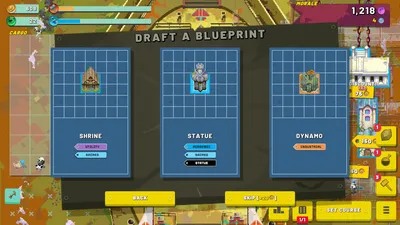
An Exark synergy is a repeatable relationship between a building, a crew member, a relic, a tag or a trigger. It is not simply three strong items placed on the ark. The pieces need to activate each other often enough to justify their Food, space, crew slots and route risk.
Use this four-step method whenever a new draft appears:
- identify the current bottleneck;
- choose the building that addresses that bottleneck;
- assign crew where the effect repeats most often;
- take a relic only when it multiplies the working engine or fixes its next failure point.
This method explains why the same relic can be excellent in one run and mediocre in another. Its value depends on the buildings already cycling, the tags available, and the space left on the ark.
Step One: Name the Bottleneck
Before choosing the next card, name the problem in one sentence:
| Bottleneck | Better question |
|---|---|
| Food deficit | Which building or crew choice keeps cycles running? |
| Weak Production | Which producer can be amplified without starving Food? |
| Low Inspiration | Which crew or building turns the current route into a better draft? |
| Low Gold | Is a market purchase worth a new building consumer? |
| Morale loss | Can Armor, control or a focused weapon close the timing gap? |
| Full board | Which object can do two jobs, and which object has no trigger? |
Ultra C and Retromation’s runs show how quickly a build improves after the Food bottleneck is fixed. Sifd and Wanderbots show the next layer: tags, Guild effects, crew and relics can then multiply a functioning engine.
Step Two: Give Every Building a Job
Buildings usually fit one of six jobs:
- Producer: creates Food, Gold, Production or Inspiration.
- Multiplier: improves a nearby building, range or cycle.
- Military: deals damage, controls enemies or restores Morale through attacks.
- Crew platform: provides slots or makes assigned crew more valuable.
- Converter: consumes crew, items or a resource for a one-time effect.
- Trigger engine: creates an event that other objects can repeat or amplify.
Write the job beside the building while testing a run. If the next building has no job that helps the current engine, wait for a more relevant reward. A board with many disconnected effects often looks powerful in a tooltip list but performs poorly because too few cycles activate the chain.
Step Three: Make Crew Earn Its Slot
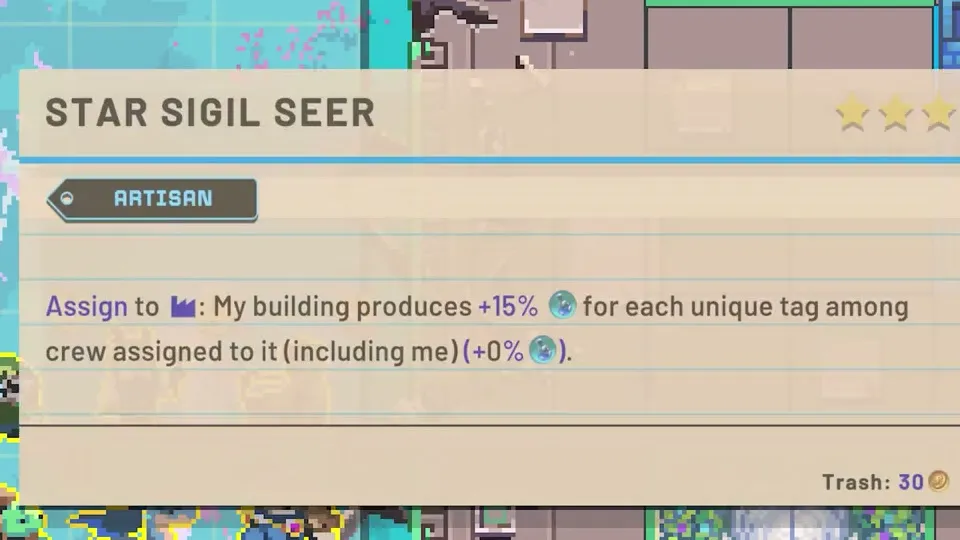
Crew can be assigned to a building, provide a tag, improve a cycle or be expended for an immediate effect. The correct choice depends on time horizon.
Assign for Repeated Value
Assign crew to a fast or high-impact building when the bonus will repeat across enough cycles to repay the slot. A Food or cycle-speed bonus is especially valuable early because it supports every later building. A damage or multiplier bonus is more valuable once the weapon already fires reliably.
Expend for a Timing Problem
Expend crew when the one-time effect prevents an immediate collapse, unlocks a needed building or completes a critical upgrade. Do not consume a crew member merely because the button is available; first check whether the repeated assignment is worth more over the next route.
Patch 1.03 adds a House glyph to House-specific crew, buildings and items in the tooltip background. Use it to record House identity in a database or guide. Two crew members with similar names or roles may have different value when the current House and tag plan changes.
Step Four: Choose Relics by Multiplication or Repair
Relics usually have a global effect or change how a particular engine scales. Evaluate a relic against the current bottleneck rather than against a tier list:
| Relic role | When it is valuable |
|---|---|
| Cycle support | Food is positive but buildings are too slow |
| Crit or multicast | A fast, reliable building already fires often |
| Trigger support | Multiple objects already create the same event |
| Crew support | The build has unused slots or strong tag interactions |
| Survival support | Morale or Armor cannot cover the next route |
| Space compression | A multi-use slot can replace two isolated objects |
The relic should either make the proven engine better or repair the failure it will meet next. A combat relic that arrives before the ark can feed a weapon may be weaker than a plain Food or cycle relic.
Reading Tooltips After Patch 1.03
When comparing buildings, crew and relics, read the tooltip in this order:
- House glyph: is the object specific to a House?
- Tags: does it match the current building, crew or Guild plan?
- Trigger: what event activates the effect?
- Cost: what does it consume or occupy?
- Range: which tiles or neighbors can receive the benefit?
- Exit plan: can you trash or move it later, or is it Immovable?
Rite buildings now show the Immovable tag, and the T hotkey can trash buildings, crew and items while dragging. These are quality-of-life changes, not permission to place objects without a plan: confirm the tag and role before locking the layout.
Example: A Food-to-Combat Chain
This is a framework, not a fixed card list:
- place a dependable Food producer;
- add a multiplier or crew member that improves its cycle;
- use Production or Inspiration to obtain the next building and crew layer;
- reserve a compact zone for a military building and its support;
- take a relic that improves the weapon only after it can cycle reliably;
- compare Morale gained from attacks with incoming damage;
- stop adding unrelated objects once the route is stable.
Retromation’s and Ultra C’s runs show the economy-to-crit transition, while Sifd’s run shows how Guild, tags and triggers can create a high-output engine. The useful pattern is the order of operations, not the exact draft.
Example: A Guild and Tag Chain
Guild-focused runs work when the buildings, crew and relics all reinforce the same tag direction. Start by checking how many unique Guild or matching-tag objects the current draft can realistically support. Then assign crew that increases the value of those objects instead of taking unrelated bonuses.
Wanderbots’ run shows the value of reading tags before choosing a crew member, and Sifd’s run shows how multiple Guild objects can organize the board. The risk is board saturation: a tag chain that fills every tile may leave no room for Food, Armor or a route-specific answer.
Triggers, Crit and Multicast: Add Them Last
Crit, multicast and triggered effects are powerful because one cycle can create several downstream events. They are also difficult to debug. Add them after Food, space and the base cycle are stable.
Use this diagnostic when the chain underperforms:
- If the first building is not cycling, fix Food or its trigger condition.
- If the first building cycles but nothing follows, check range, tags and crew assignment.
- If the chain starts but Morale falls, add Armor, control or a faster payoff.
- If the chain is strong but the board is full, remove disconnected objects before adding more multipliers.
Patch 1.03 includes performance work around triggered effects. That is helpful for large chains, but a clean layout is still easier to understand than a pile of unlabelled triggers.
Space, Immovable Buildings and the Exit Plan
Space is a resource. Leave room for the unexpected building, crew slot or defensive answer that the route may offer. Guild Hall-style and rigging effects can compress multiple jobs into one area, but they also increase dependency risk.
Before placing an Immovable building, check:
- its neighbor and range requirements;
- whether the current House and tags can use it;
- whether it competes with the main Food producer or weapon;
- what happens if the next two drafts are poor.
If there is no answer to the last question, wait. The strongest synergy is still a bad placement when it permanently blocks the recovery plan.
Relic and Crew Priority by Run Phase
Early Run
Prioritize Food, cycle speed and the crew that improves the most frequent producer. A global relic that keeps the economy running is often better than a narrow late-game multiplier.
Middle Run
Commit to one main direction—economy, Guild, creature, military or another clear tag plan. Add a relic when it multiplies an existing interaction and keep enough space for the next building.
Final Route
Do not change the entire board for one attractive tooltip. Improve the component that fails the next route: damage, Armor, Morale recovery, Food or control. Use the final flight report to record what actually activated.
FAQ: Exark Building, Crew and Relic Synergy
What is the best Exark building and relic combination?
There is no universal combination. The best pair is the one that improves the current bottleneck and activates often enough to repay its Food, space and crew cost.
Should I prioritize crew or relics?
Prioritize whichever fixes the current failure. Early crew can stabilize Food or cycle speed; a relic can provide a global multiplier. Compare their repeated value across the next route.
Why does my Exark trigger build not work?
Check Food, range, tags, House identity, crew assignment and trigger order. A strong effect that never activates is not part of the engine yet.
Do I need to use the T hotkey?
No, but Patch 1.03 makes it faster to trash a building, crew member or item while dragging. Use it after checking the object’s role and tags.
Video research note: This guide paraphrases the linked public gameplay videos and their auto-generated English captions. It extracts repeatable planning lessons without copying transcript passages, and should be rechecked after future balance updates.
Verification & sources
Checked against Exark 1.03 · Last updated 8/30/2026
- Source: Official Exark Patch 1.03 announcement
- Source: Retromation - Exark gameplay video
- Source: Wanderbots - Exark gameplay video
- Source: Sifd - Exark gameplay video (sponsored)
- Source: Ultra C - Exark gameplay video
Related videos


Gallery
Related Articles
crew
Exark Crew Database - Verified Names and Interactions
Browse the Exark crew reference: confirmed crew names, trigger interactions, and the evidence fields for future skill records.
buildings
Exark Building Tier List - Best Buildings Ranked
See the best buildings in Exark ranked by priority. Find out which Food, Production, Inspiration, and Gold buildings to build first.
crew
Exark Crew Guide - Assignments, Tags and Expend Decisions
Learn how to hire and assign Exark crew, compare repeated bonuses with expend effects, and use crew tags to improve Food, Guild and combat builds.
Was this helpful?
Thanks for the feedback!