Exark Patch 1.03 Notes - 16:10 Support, Hazard Rewards and Tooltip Fixes
Exark Patch 1.03 adds 16:10 support, Hazard Star Shards, House glyphs, the T trash hotkey, Morale feedback, performance improvements, and bug fixes.
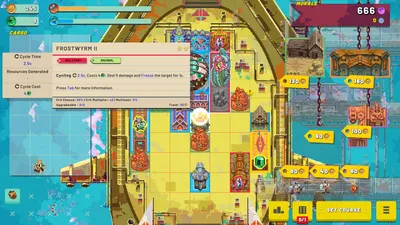
Patch 1.03 at a Glance
The official Exark 1.03 announcement is dated August 26, 2026. It is primarily a quality-of-life, readability, performance and stability update: it improves display support, adds a clearer Hazard reward, makes House-specific tooltips easier to recognize, and removes friction from common ark-management actions.
This page separates confirmed patch notes from editorial observations taken from recent public gameplay videos. The video section is a paraphrased synthesis of auto-generated captions and visible run decisions; it is not a replacement for the official change list.
What Exark Patch 1.03 Changes
16:10 Resolution Support
Patch 1.03 adds a range of 16:10 resolutions to Video Settings. This matters for players using laptop and productivity-monitor panels where the older resolution list could leave unused space or make the ark UI feel cramped.
Hazard Rating Now Pays Star Shards
Successful runs with the Hazard-o-Meter enabled now reward 2 Star Shards for every 5 Hazard Rating. That makes a high-risk route more useful for account progression, instead of treating extra Hazard only as a difficulty choice.
The practical implication is to treat Hazard as a budget. A stable Food surplus, enough Morale or Armor to absorb the next encounter, and a route that does not add unnecessary flight time are more valuable than taking every risky reward. The bonus is awarded for a successful run, so a greedy route that collapses before the report is not a progression strategy.
House Glyphs in Building, Crew and Item Tooltips
Buildings, crew and items that are specific to a Great House now show that House’s glyph in the tooltip background. This is a small UI change, but it improves three real decisions:
- spotting House-locked content while comparing a draft;
- checking whether a new crew member fits the current House and tag plan;
- recognizing why two visually similar items behave differently in a mixed build.
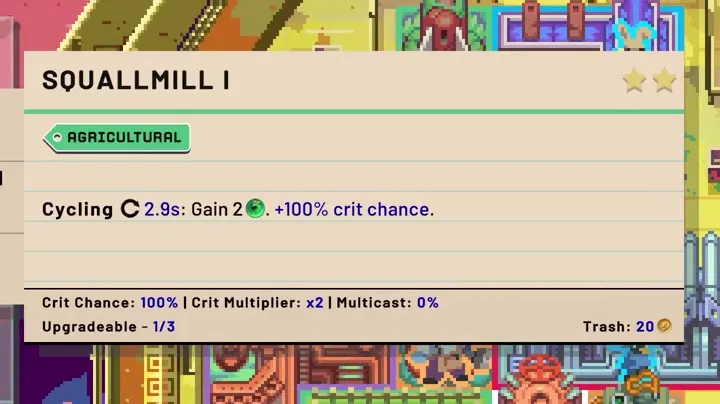
If you are building a database, record the House identity alongside the name, tags and effect. A tooltip screenshot without the glyph or version context is much harder to verify later.
The T Hotkey for Trashing
While dragging a building, crew member or item, press T to trash it. This is particularly useful during layout cleanup: you can remove a low-value draft without opening a second confirmation path or losing the item under a crowded ark interface.
Use this hotkey deliberately. Before trashing, check whether the object is part of a trigger chain, is occupying a valuable Plus tile, or is needed to keep Food positive. The speed improvement is real, but so is the cost of an accidental deletion during a fast reroll.
Clearer Morale Feedback From Military Buildings
Attacking military buildings now show floating text for the Morale gained from the attack. That gives combat players a faster way to answer a key question: is the current weapon cycle paying back enough Morale to justify its space, crew and resource cost?
The feedback is also useful for comparing a military route with a pacifist route. A weapon that looks strong on its damage number can still be a poor choice if the ark loses too much Morale before the next cycle. Watch the floating gain together with incoming damage and Armor rather than reading damage in isolation.
Rite Buildings Also Show the Immovable Tag
Rite buildings now display the Immovable tag. Treat that tag as a placement warning: reserve the correct slot and check adjacent bonuses before committing the building. The label is especially important for new runs where the first open space is rarely the best long-term location.
Performance and Bug Fixes
The patch also includes the following changes:
- improved performance, especially around triggered effects;
- fixed an infinite loop and crash involving two Starports, or rigged equivalents, affecting one another;
- fixed the Map screen Back button becoming difficult to click after opening and closing Settings;
- fixed the Courtier shader not appearing after a reload;
- fixed a rare save-game loading issue.
The triggered-effects optimization is relevant to late runs because several recent videos build large crit, multicast and trigger chains. Those chains can be powerful, but they also create more events for the game to process and more moving parts for a player to debug.
What Recent Exark Gameplay Videos Reveal
The videos linked below are not official patch notes. They are useful because they show how the systems behave across complete runs, including the moments where a promising build stops working.
Food Is the First Stability Check
Ultra C, Retromation, Sifd and Ash Descends all spend substantial time learning or explaining the same core interaction: Food fuels building cycles, and a surplus Food stockpile makes those cycles faster. When the stockpile turns negative, the ark does not merely earn less; buildings can stop cycling, which delays Production, Inspiration, weapons and the next recovery option.
That creates a common two-stage failure:
- a player sees an attractive damage, Guild or relic opportunity and expands before the economy is stable;
- the extra buildings consume the Food buffer, slowing the whole chain and leaving too little output to repair it.
The practical patch-1.03 rule is simple: check the Food result after every major placement, upgrade and crew assignment. If Food is only barely positive, delay the next combat building until the next route choice or resource cycle gives the ark more room.
Morale Has Two Viable Routes
Recent runs show two broad approaches:
- Pacifist or economy-first: use Food, Production, Inspiration and defensive effects to keep the ark moving while avoiding unnecessary fights.
- Military: spend space and crew on weapons, then use attack cycles to generate Morale and rewards quickly enough to offset incoming damage.
Neither route is automatically safer. Ash Descends’ run is a useful beginner lesson: a run can generate plenty of Food and still lose because Gold, damage and route length were not balanced. Sifd’s late run shows the opposite problem: a build can reach very high Armor and strong trigger output, yet still fail when the available space and endless enemies outgrow the engine.
Patch 1.03’s floating Morale text makes this comparison easier to test. After an attack, record the visible Morale gain, then compare it with the damage received and the time before the next attack. That is more reliable than copying a weapon from a screenshot.
Plus Tiles and Adjacency Are Build Multipliers
Retromation and Sifd repeatedly adjust buildings by a single tile to improve a range, a tag interaction or a Plus-tile bonus. Wanderbots also shows how Guild Hall-style effects can turn one building slot into a platform for another building while preserving useful placement properties.
This is why “best building” lists are less useful than a layout plan. A modest building on a correct Plus tile can outperform a stronger isolated building if it accelerates the Food cycle, adds a trigger, or feeds the main weapon. Before adding a new object, identify its job:
- produces a resource;
- amplifies a nearby producer;
- creates damage or control;
- converts crew/items into a one-time benefit;
- enables the next trigger or upgrade.
Crew and Relics Complete the Engine
The videos show crew being assigned for a permanent building bonus, or expended when a one-time effect is worth more than keeping the slot. Relics often act globally, so a relic that looks average in a blank run can become valuable after the ark already has crit, multicast, Guild, creature or military tags.
Wanderbots’ runs emphasize tag awareness and repeated crew acquisition, while Ultra C and Retromation demonstrate how crit, multicast and trigger effects can compound. The lesson is not to copy a single relic pick. Instead, compare the relic with the current bottleneck: Food, cycle speed, damage, survivability, available space or crew supply.
Space and Immovable Placement Decide the Late Game
Every video eventually runs into board pressure. The ark must fit economy, weapons, crew slots, buffs and the objects needed to trigger them. Immovable buildings make that pressure permanent, while Guild Hall and rigging effects can make one slot do multiple jobs.
Place an Immovable building only after checking its range, neighboring tags and the direction of your next upgrades. If it cannot support the current build, a powerful effect becomes a permanent layout tax.
Strong Numbers Can Still Lose
Sifd reaches a very strong late build before endless enemies and space constraints break it. Ash Descends reaches the final route with a Food-heavy economy but not enough balance to survive the combat profile. These are valuable failure cases for searchers looking for an “Exark build that wins every run”: there is no universal build, because route length, available drafts and House identity change the puzzle.
Practical Post-1.03 Checklist
Use this short checklist when testing a new Exark run:
- Set a comfortable resolution, including the new 16:10 options where relevant.
- Keep Food positive before adding a second layer of synergy.
- Confirm whether the next building, crew member or item is House-specific by checking its tooltip glyph.
- Reserve a slot for any Rite or other Immovable building before placing it.
- Use T only after checking the object’s tags, crew and trigger role.
- In combat, compare Morale gained from attacks with incoming damage and Armor.
- Take Hazard when the current economy can finish the route, not merely when the reward looks attractive.
- Treat the final build report as evidence: inspect what generated Food, Gold, damage and Morale before copying the layout.
FAQ: Exark Patch 1.03
How many Star Shards does Exark Patch 1.03 give for Hazard Rating?
Successful runs with the Hazard-o-Meter enabled give 2 Star Shards per 5 Hazard Rating.
What does the T key do in Exark?
While dragging a building, crew member or item, press T to trash it.
How do I know whether a building or crew member belongs to a House?
Patch 1.03 adds the relevant House glyph to the tooltip background for House-specific buildings, crew and items.
Are these gameplay observations official patch notes?
No. The change list comes from the official Steam announcement. The Food, Morale, layout and build lessons are editorial observations from the linked public gameplay videos and their auto-generated captions.
Verification note: Official changes were checked against the Exark Steam Community announcement. Gameplay observations were paraphrased from the linked videos and should be rechecked after future balance patches. Sponsored video content is labelled in the source list.
Verification & sources
Checked against Exark 1.03 · Last updated 8/30/2026
- Source: Official Exark Patch 1.03 announcement
- Source: Ultra C - Exark gameplay video
- Source: Retromation - Exark gameplay video
- Source: Wanderbots - Exark gameplay video
- Source: Sifd - Exark gameplay video (sponsored)
- Source: Ash Descends - Exark gameplay video
Related videos


Gallery
Related Articles
updates
Exark Patch 1.01 Notes - Star Atlas and Hotkeys
Read the official Exark 1.01 patch notes: new time-control hotkeys, Star Atlas storage, tooltip settings, and launch bug fixes.
updates
Exark Patch 1.02 Notes - Performance and Building Fixes
Read the official Exark 1.02 and 1.02a patch notes: smoother crowded flights, experience changes, and building interaction fixes.
guides
Exark Morale Build Guide - Food, Military Damage and Hazard Risk
Build a stable Exark Morale engine with Food, Armor, military timing and Hazard decisions. Learn why strong damage still fails when the route is too long.
Was this helpful?
Thanks for the feedback!