Exark Building Layout Guide - Plus Tiles, Space and Immovable Buildings
Learn how to plan Exark building layouts with Plus tiles, ranges, tags, Guild effects, movable limits and permanent Immovable placements.
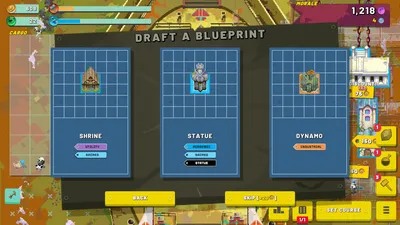
Why Does Building Placement Matter in Exark?
Exark’s ark has a limited grid, and a building’s position can change its value as much as its printed effect. Ranges, neighboring tags, Plus tiles, crew slots, mounted buildings and future upgrades all compete for the same space.
The best Exark layout is therefore not a universal rectangle. It is a board that keeps the current engine alive while leaving enough room for the next layer of the build. Recent gameplay videos repeatedly show players moving a building by one tile, delaying an upgrade, or removing a tempting object because the long-term chain needed a different slot.
Start With Jobs, Not Building Names
Before placing an object, give it one job:
| Job | Typical question |
|---|---|
| Economy | Does it produce Food, Gold, Production or Inspiration? |
| Amplifier | Which producer or weapon does its range improve? |
| Damage | Can it attack often enough to justify its space and crew? |
| Control | Does it freeze, slow or otherwise reduce incoming pressure? |
| Conversion | Does it turn crew, items or a resource into a one-time benefit? |
| Trigger | What event does it start, repeat or multiply? |
If a new building has no clear job in the current draft, keep the slot open. “More buildings” is not automatically “more economy” because every cycle also changes Food demand and the number of objects competing for multipliers.
Movable vs Immovable Buildings
| Type | Rule | Layout risk |
|---|---|---|
| Movable | Can be picked up and moved while the run allows it | You have a limited movable-building budget, so repeated reshuffling has a cost |
| Immovable | Cannot be removed after placement | A bad range, tag or neighbor decision stays on the board |
Plan Around the Movable Cap
The movable cap changes the value of an empty tile. A space that looks unused may be the only safe place for a future weapon, Guild platform or Food producer. Avoid filling the board with low-impact buildings just because the early draft makes them available.
When you do move a building, move the whole relationship in your head: its assigned crew, the building it buffs, the Plus tile it leaves, and the route reward you still need. A locally better position can damage the engine if it breaks a range chain elsewhere.
Be Careful With Immovable Buildings
Patch 1.03 makes Rite buildings’ Immovable tag visible in their tooltip. Use that information before placement. An Immovable building should have a planned range, known neighbors and a role in the next upgrade—not merely the first open slot beside the core.
Plus Tiles and Neighbor Bonuses
Plus tiles are multipliers because they improve the output or cycle value of the object placed there. A resource producer on a Plus tile may be worth more than a stronger producer placed in a neutral square, especially when the producer cycles frequently.
Build the layout in this order:
- mark the Food producers and their best available multiplier tiles;
- place the building that converts or amplifies that Food loop;
- reserve the main weapon’s range and crew slots;
- add global or Guild effects around the objects they actually improve;
- fill the remaining spaces with flexible buildings, not permanent liabilities.
Retromation and Sifd both demonstrate the value of checking a building’s real neighborhood instead of reading its card in isolation. A crit, multicast or trigger bonus can be stronger when it reaches a fast-cycling producer, but the same bonus may be wasted if it is attached to a slow or inactive building.
Tags, House Identity and Tooltip Checks
Tags are layout instructions. If the current engine depends on Guild, creature, military, academic or industrial interactions, keep matching buildings and crew close enough to make the tag chain worthwhile. Patch 1.03 adds a House glyph to House-specific building, crew and item tooltips, making it easier to avoid mixing an attractive draft into a build that cannot support it.
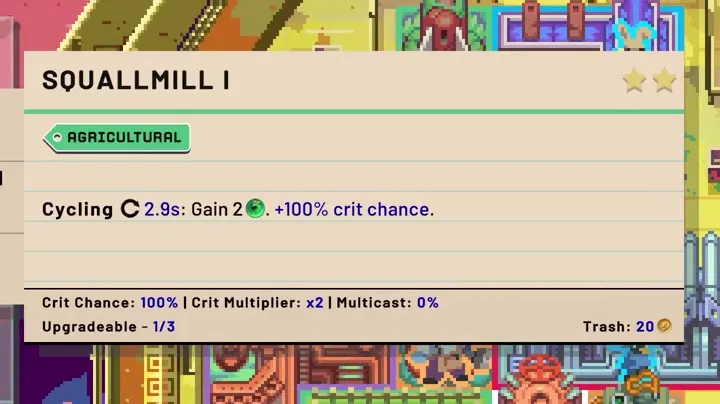
For each candidate, record four things before placing it:
- the tag or House identity;
- the range or neighbor condition;
- whether it consumes a crew or item slot;
- what event activates its effect.
This small checklist prevents a common late-run mistake: adding a strong-looking object whose trigger never fires because it is outside the required range or lacks the matching tag.
Crew Turns Space Into Specialization
Crew is part of the layout even when the crew member is not a building. Assign a high-value crew member to the building that runs often or currently limits the build. A worker that improves a fast Food cycle can be more valuable early than a flashy combat crew member waiting on an unbuilt weapon.
Crew can also be expended for a one-time effect. That changes the question from “Is this crew strong?” to “Is this crew stronger assigned over the next several cycles, or consumed to solve the next immediate bottleneck?” Keep the crew’s tag in the layout plan until you decide.
Wanderbots’ runs show how crew tags and building tags can reshape the board, while Sifd’s Guild-focused run demonstrates how multiple Guild objects can become the organizing spine of a layout. The exact draft will differ, but the method is consistent: choose the engine first, then use crew to make the important slots better.
Guild Halls, Rigs and Multi-Use Slots
Some effects allow a building slot to perform more than one job. Guild Hall-style effects and rigging can preserve useful placement properties while adding another building or trigger to the same area. This is powerful when space is the bottleneck, but it also creates dependency risk.
Before using a multi-use slot, ask:
- Which effect remains if the mounted building is removed?
- Does the new object change Food demand or cycle speed?
- Is the slot still inside the weapon, amplifier and crew ranges?
- Would a flexible movable building be more useful later?
Multi-use space is strongest when it compresses an already-proven engine. It is weaker when used to hide a weak Food loop.
How to Build an Economy-First Layout
An economy-first board should look boring at the beginning. Keep Food producers together with their best available support, then add Production and Inspiration nearby if the ranges allow it. Leave a corridor or a small block of open tiles for the route’s next high-value draft.
Check the result after each cycle. If Food is barely positive, the next building should usually improve Food, cycle speed or survivability rather than add another consumer. Recent runs by Ultra C and Retromation show that a crit or multicast chain only becomes impressive after the underlying Food engine can keep cycling.
How to Build a Military Layout
Military buildings need a dedicated zone with the right ranges, crew slots and defensive support. Do not scatter one weapon into every empty corner. A compact damage package is easier to amplify, easier to staff and easier to compare with the incoming Morale loss.
Patch 1.03 adds floating text for Morale gained from attacking military buildings. Use it as a layout test: if the weapon gains too little Morale relative to its cycle time, space and incoming damage, move the next slot toward economy or defense instead of adding a second copy.
Armor and control effects are part of the military layout. A freeze or slow effect can buy the weapon another cycle; a positive Armor pool can keep a high-damage route alive long enough for its trigger chain to start.
What Recent Videos Teach About Late-Run Space
Retromation, Sifd and Wanderbots all reach a point where the board is crowded with resources, weapons, Guild effects, crew and relic-driven multipliers. Their runs illustrate three practical rules:
- a trigger chain is only useful if its supporting buildings still have space and Food;
- a powerful relic can be less valuable than a flexible slot when the board is full;
- endless-mode strength is not the same as a clean route victory—enemy scaling and board pressure eventually test the weakest part of the engine.
That is why it is useful to take a screenshot or write a short note at each major layout change. You can then identify whether the run improved because of adjacency, a crew assignment, a relic, a route reward or simply a lucky draft.
A Practical Exark Layout Checklist
- Place the first Food producer where its range or Plus tile can support future growth.
- Keep enough open space for a weapon, a Guild effect and one unexpected draft.
- Check House glyphs and tags before committing a mixed draft.
- Place assigned crew where it improves the most frequent or most important cycle.
- Do not place a Rite or other Immovable building until its neighbors are known.
- Group military buildings so one amplifier, crew package or control effect can reach them.
- Recheck Food after every upgrade, rig, mounted building and major relic.
- Use T to trash only after checking the object’s trigger and tag role.
FAQ: Exark Building Placement
Is it better to group buildings in Exark?
Group buildings when their ranges, tags or Plus-tile effects benefit from being together. Do not group objects simply by visual type if the resulting layout loses Food, weapon range or future space.
What should I do with an Immovable building?
Plan its range and neighbors first. The 1.03 tooltip makes Rite buildings’ Immovable status clearer, so use the tag as a placement warning.
Why did my Exark building stop cycling?
Check Food first. A negative Food result can slow or stop the cycle engine. Then check whether the building has the crew, tag, range or trigger condition its effect requires.
Should I fill every empty tile?
No. Open space is a resource in Exark. Reserve it for future multipliers, weapons, crew slots and route rewards that fit the engine better than the current draft.
Video research note: The layout lessons are an editorial synthesis of the linked public gameplay videos and their auto-generated English captions. They describe observed decisions and trade-offs, not a guarantee that one fixed layout wins every House or route.
Verification & sources
Checked against Exark 1.03 · Last updated 8/30/2026
- Source: Official Exark Steam page
- Source: Retromation - Exark gameplay video
- Source: Sifd - Exark gameplay video (sponsored)
- Source: Wanderbots - Exark gameplay video
- Source: Nookrium - Exark gameplay overview
Related videos


Gallery
Was this helpful?
Thanks for the feedback!